
QTP Linear Framework – Complete Reference with Example
In the previous article, we discussed what a test automation framework is all about and also provided brief overview about various QTP framework types that you can use while scripting. Starting with this article, we will cover each of the QTP framework types in detail.
In this article, we will cover the following aspects of QTP Linear Framework –
- a) What is QTP’s Linear Framework.
- b) What are the components that constitute the linear framework.
- c) How to write scripts in QTP’s Linear Framework.
- d) Advantages and Disadvantages of the linear framework.
UPDATES
1) You are free to download and play around with the code used for this framework. The download link is available at the end of the article.
2) Just like this, we have written more articles on various other QTP Frameworks. If you wish to have a look at those, please visit QTP Framework main page. The bottom of the page contains links to other QTP Frameworks.
Let’s discuss each of these points one by one.
What is QTP Linear Framework approach?
Linear Framework is nothing but writing all the steps in your action one after the other in a linear form. This approach is also called linear scripting. In this approach, your entire test case flow will be written in QTP in a linear fashion.
Consider an example where you have a test case to login to application, search for some data and then logout. In linear framework, the code would look like something shown below.
'Code to Open Application
'Code to enter user name in Login Page
'Code to enter password
'Click on Login button and verify successful Login
'Search for the required data
'Logout from the application
'Close the application
As you can see in the above example, you are not doing much in terms of framework creation with this type of QTP Framework. Hence this is the simplest framework to use and implement. The normal Record and Playback that we do with QTP falls under this framework.
Let’s now see some advantages and disadvantages of QTP Linear Framework. This would help you analyze the positives and shortcomings of this framework and thus help determine the situations where this framework can be used.
QTP Linear Framework – Advantages and Disadvantages
Advantages
- a) Very little automation expertise required. Only the tool knowledge is necessary for creating scripts.
- b) This is the fastest way to create scripts.
- c) Since the framework is not complex, it becomes very easy to understand the flow.
Disadvantages
- a) Since the code is written in linear manner without the use of any functions, there is very little scope of re-use.
- b) The only way to re-use the code is to copy paste it wherever needed. Hence you will have the same code being written at multiple place. Maintaining this code is very time consuming and error prone because you have to make changes at all the affected places.
- c) In this framework, test data is hard-coded in the script. So you cannot use the same code to test multiple sets of data. Either you have to change the data after every run or you have to create multiple copies of the code to test different data. Both these methods are inefficient.
Where to Use QTP Linear Framework?
From the above section you can clearly make out that the disadvantages of this framework outweigh the advantages. Re-usabilty and maintainability are some of the major factors that are looked at when creating an automation framework. Because of this reason, you would rarely find linear framework being used in any real-life projects.
Since you can’t use it in complex real life automation projects, does this mean that this framework is of no use at all? Well.. not exactly. You can use this framework for the tasks where you want to finish off the work quickly. This can also be used to support manual testing.
Consider this situation. Suppose you are testing an application where you have to create a lot of orders. Now creating these tasks is a lengthy and time consuming process. What you can do here is just record the order creation flow and run the script to create orders. You can run the script when you go out for lunch and by the time you are back, you would have your orders ready :–)
You can also use it for many other repeatable tasks such as checking your GMail accounts for new mails when you start your machine, filling up time sheets etc. The possibilities are endless!!
Components in QTP Linear Framework
Since this framework is pretty simple and straightforward, there are not many components that are usually associated with it. Figure below lists the typical components used with this framework.
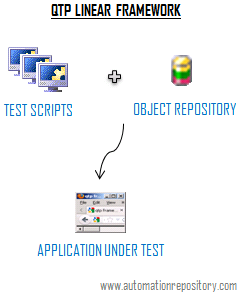
1) Test Scripts: Even though you would not be automating many test cases using this approach, whatever scenarios you have with you, you can club them in one or more QTP tests.
2) Object Repository: If you are using record and playback method to create test scripts, you would have the object repository being automatically generated for you. If required, you can make some changes to the object properties in the repository. You can use Descriptive Programming Concepts and thus skip the object repository altogether.
You can also use some additional components such as a driver script if you want to schedule the time when the test cases should be run.
Example of QTP Linear Framework
We will now create a script in QTP Linear Framework which would open GMail and retrieve the number of emails received in your Inbox today. Using QTP’s AOM, we will also create a driver script which will help us schedule the execution time of this test case.
Code to check the inbox for mails received today
Dim iTodayMails
iTodayMails = 0

'Open GMail
SystemUtil.Run "iexplore.exe", "http://www.gmail.com"
'Page Sync
Browser("Gmail").Page("Gmail").Sync

'Login to Gmail
Browser("Gmail").Page("Gmail").WebEdit("UserName").Set "valid gmail login id"
Browser("Gmail").Page("Gmail").WebEdit("Password").Set "valid gmail password"
Browser("Gmail").Page("Gmail").WebButton("SignIn").Click
'Page Sync
Browser("Inbox").Page("Inbox").Sync

'Search for emails received today in your inbox
'Logic - The mails received today will have only time in the last(8th) column.
'Time is always followed by am or pm. So the code check for the last 2 characters and matches it with am or pm.
For iR = 1 to 50
	sLastColumnText = Browser("Inbox").Page("Inbox").Frame("Frame").WebTable("Emails").GetCellData(iR,8)
	sLast2Characters = Right(sLastColumnText, 2)
	If sLast2Characters = "am" or sLast2Characters = "pm" Then
		iTodayMails = iTodayMails + 1
	Else
		'Exit For
	End If
Next
'Report the number of  mails received today
Reporter.ReportEvent micPass, "Total Emails Received Today - " & iTodayMails, ""

'Sign out from GMail
Browser("Inbox").Page("Inbox").Frame("Frame").Link("SignOut").Click
Browser("Gmail").Page("Gmail").Sync
'Close the browser
Browser("Gmail").Close()
Driver Script created using QTP AOM
Dim testCasePath, resultPath
testCasePath = "D:\QTP\QTP Framework Samples\QTP Linear Framework Demo\GMail Inbox1"
resultPath = "D:\QTP\QTP Framework Samples\QTP Linear Framework Demo\Result"

'Open QTP
Set qtpApp = CreateObject("QuickTest.Application")

'If QTP is not open then open QTP application
If qtpApp.launched <> True Then
	qtpApp.Launch
End If

'Make the QuickTest application visible
qtpApp.Visible = True

'Set QuickTest run options
qtpApp.Options.Run.ImageCaptureForTestResults = "OnError"
qtpApp.Options.Run.RunMode = "Fast"
qtpApp.Options.Run.ViewResults = True

'Open the test in read-only mode
qtpApp.Open testCasePath, True
WScript.Sleep 2000

'set run settings for the testi
Set qtpTest = qtpApp.Test

'Instruct QuickTest to perform next step when error occurs
qtpTest.Settings.Run.OnError = "NextStep"

'Create the Run Results Options object
Set qtpResult = CreateObject("QuickTest.RunResultsOptions")

'Set the results location
qtpResult.ResultsLocation = resultPath

'Run the test
WScript.Sleep 3000
qtpTest.Run qtpResult
You can add this DriverScript code in Windows Start-up or schedule it through Windows Task Scheduler if you want to schedule the test case run at a particular time in a day or want to run the test case whenever you start your system.
This was all about using QTP Linear Framework approach while writing your test scripts. Do you find any situations where you can use this framework to save yourselves from doing some boring tasks? Do let us know your ideas in the comments section.
If you enjoyed this article, you can join our blog to get new articles delivered directly in your inbox.
Visit QTP Frameworks Main Page for links to articles on other frameworks. You can also visit our QTP Tutorials page for more QTP Tutorials.


Pingback: QTP Frameworks : Designing QTP Modular Framework from scratch - Automation Repository - Automation Repository()
Pingback: Data Driven Framework in QTP : The Complete Guide – Part 1 - Automation Repository - Automation Repository()
Pingback: QTP Frameworks – An Introduction - Automation Repository - Automation Repository()
Pingback: Basics of Keyword Driven Framework in QTP - Automation Repository()
Pingback: Keyword Driven Framework in QTP | QTP Framework()
Pingback: Designing Keyword Driven Framework mapped at Functional Level – Part 2 - Automation Repository - Automation Repository()
Pingback: complete real time scripts of qtp « TESTING HUB()
Pingback: Designing Hybrid Framework in QTP - Part 2 - Automation Repository - Automation Repository()
Pingback: Designing Hybrid Framework in QTP – Part 2 | Tech Lessons()